My Lucky Scoop Studio Wiki
Your cozy scoop studio index for codes, guides, upgrades, and beta tips.
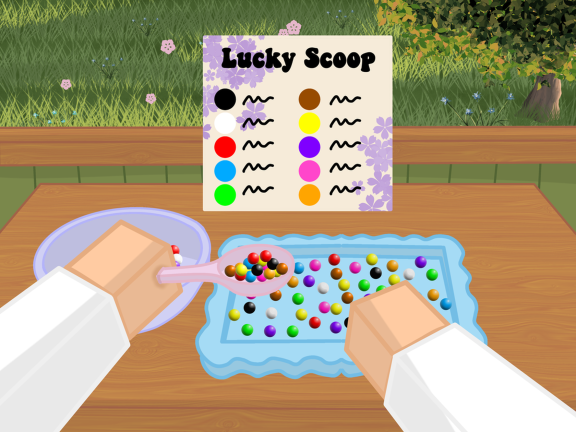
Welcome to the unofficial My Lucky Scoop Studio wiki — a fan guide for the cozy Roblox scoop-studio loop where you read customer tickets, scoop colorful marbles, collect products, pack orders, earn coins, and decorate your own studio. The experience is still in beta (20M+ visits), so expect polish patches and occasional bugs while Twinkle Bloom iterates.
Play My Lucky Scoop Studio on Roblox
Open the official place here: Play My Lucky Scoop Studio / Lucky Scoop Order. Confirm you are on the Twinkle Bloom experience before you spend Robux or grind badges. Servers hold up to 12 players, and the game is free to join.
What this wiki covers
Use this hub as a map, then jump into the pages players search for most:
- Codes — working and expired promo codes (none active as of November 2026)
- Scripts — public auto-order hubs, safety notes, and executor caution
- Tier List — Basket, Cart, coin packs, and upgrade priority
- Guides Hub — how to play, pack, earn coins, customize, and grind badges
- Getting Started — first-session checklist
- Badges Guide — First Order through 50 / 100 milestones
- Gamepasses — Basket, Cart, and coin packs
- Controls — PC and mobile interactions
- Co-op Tips — 12-player studio etiquette
- Players — badges overview, rarity, and long-term goals
- Updates — beta patch timeline and what changed
Core loop in one minute
- Accept an order ticket and read scoop count plus color notes.
- Scoop colorful marbles at the bowl, then collect the matching products.
- Pack everything cleanly into the order box.
- Ship the order, collect coins, and reinvest into carry capacity or studio cosmetics.
That Scoop → Collect → Pack → Ship loop is the entire early game. Capacity upgrades (Basket at 49 Robux, Cart at 479 Robux) matter more than decoration until you can finish multi-scoop tickets without endless trips. See the tier list before you buy coin packs.
Who this wiki is for
- New players who want a calm first hour without wasting coins
- Returning players chasing 50 and 100 order badges
- Cozy-sim fans looking for packing tips, studio layout ideas, and beta patch notes
- Players comparing Robux spends (Basket vs Cart vs coin packs)
Official and community links
- Roblox experience page — play, favorite, and follow for update alerts
- Twinkle Bloom group on Roblox — creator community for the studio scoop experience
- This wiki’s Updates page — condensed patch notes for scoop, pack, and shop changes
How we keep pages honest
Facts like release date (26 August 2026), beta status, server size, and Robux prices are cross-checked against the live Roblox page and public trackers. When a code drops or a pass price changes, we update Codes and the tier list first. Never trust random Discord pastes that claim “unlimited coins” without a verifiable in-game redeem path.
Suggested reading order
- Getting Started — finish your first order and claim early habits
- How to Play — deepen the scoop and pack loop
- How to Pack Orders — reduce failed shipments
- Earn Coins Fast — capacity-first progression
- Customize Your Studio — spend surplus coins on looks
- Badges Guide — long-term milestones
- Gamepasses — Robux spend details
- Controls / Co-op Tips — input and multiplayer
- Players — personas and rarity context
Bookmark Codes even while the list is empty — beta titles often drop their first codes around events or a wider launch window.
Disclaimer
This is an unofficial fan wiki. My Lucky Scoop Studio / Lucky Scoop Order, Roblox, and related marks belong to their owners. We are not affiliated with Twinkle Bloom or Roblox Corporation. Always confirm prices and patch notes on the official experience page.
Frequently Asked Questions
Quick answers about scooping, packing, codes, and studio upgrades.
Is My Lucky Scoop Studio free on Roblox?
Yes. Joining is free. Optional Robux buys include the Basket (49), the Cart (479), and coin packs. See the tier list for value notes.
Is the game still in beta?
Yes. The experience has been in beta since 26 August 2026. Expect bugs and frequent small updates — track them on Updates.
Where should beginners start?
Read Getting Started, then How to Play. Claim habits before cosmetics.
Is this wiki official?
No. It is a fan-made resource. Confirm announcements on the Roblox experience page and Twinkle Bloom channels.